
Manage field teams.
Prove every task.

Keep every location consistent with photo-backed task management.

20-min walkthrough · From £99/mo · Unlimited users

Staff member
EW

Emma Walsh

67%
16/24
Tasks completed
48
Photos
1
Issues
Organise Report
Client

Pickwick & Wilson

100%
41/41
Tasks completed today
Photo-verified
Photo proof · today128 photos
Photo proof captured at 8:12 AM
8:12 AM
Photo proof captured at 9:34 AM
9:34 AM
+126photos today
 
Staff member
MR

Marcus Reed

67%
12/18
Tasks completed
27
Photos
Organise Report

Used by operational teams

24–48hSetup across your locations
100%Photo-backed completion where required
UnlimitedUsers on every plan
BlueTiger Facilities logo

Managers see every London restocking route in real time — without chasing drivers for updates.

BlueTiger FacilitiesFood & Beverage Restocking
CMOS logo

Commercial office cleaning across Auckland, Wellington, and Sydney.

CMOSCommercial Office Cleaning
OSO Medical Clinic logo

Every clinical room check carries timestamped photo evidence — no extra admin to produce it.

OSO Medical ClinicMedical Facility Operations

Wherever standards matter.

From cleaning crews to restocking routes, clinics to classrooms. LogSure works wherever daily routines need to be visible, photo-backed, and provable.

Recurring work breaks when nobody can see the standard.

This is true whether the audience is a paying client, a site manager, an internal team, or your own leadership.

Managers find out too late

Missed work only becomes visible when a manager checks manually, a client complains, or another team inherits the problem.

New staff work from memory

Instructions live in heads, chats, or old checklists. Every handover creates another chance for inconsistent work.

Paper and WhatsApp are not proof

A tick on a sheet says someone intended to do the work. It does not show what happened, when it happened, or what needs attention.

Operational consistency you can verify.

LogSure turns recurring work into clear tasks, photo-backed proof, issue trails, and reports across every location.

On track, in real time

See completion against the day at a glance, with issues called out as soon as they are logged.

62

completed today

On track
6am9amNow3pm6pm

One standard, every site

Organise work by client, building, floor, room, route, or internal team.

LocationsToday
Pickwick & Wilson HQ17
Floor 2 · Pantry12
Floor 2 · Coffee Bar7
Helix Group8

Clarity for every role

Admins, managers, field staff, and clients each see the work that matters to them.

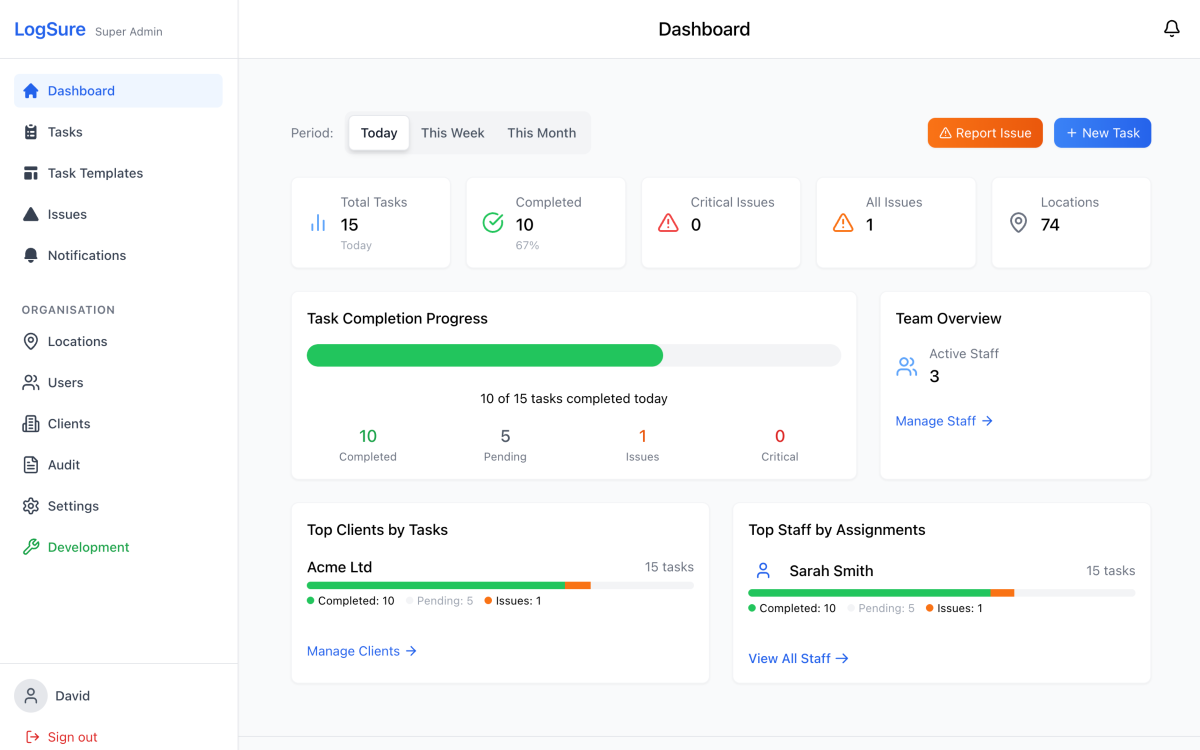
LogSure dashboard showing live task completion

Issues before escalation

Staff log problems with photos and notes so managers can resolve them before they become complaints or repeated rework.

Report issue
New issue reportednow

Fridge temperature out of range · Kitchen
Emma attached a photo and note.

How it works

From messy routines to verified standards in 3 steps

  1. 01

    Map your operation

    Add clients, sites, buildings, rooms, routes, or internal teams. Then invite staff and set the right permissions.

    Pickwick & Wilson HQ
    Floor 2 · Pantry
    Coffee Bar
  2. 02

    Set the standard

    Build recurring templates with instructions, photo requirements, schedules, and ownership. LogSure creates the right daily work.

    Daily opening checklist
    1Check coffee machine
    2Restock milk
    3Photograph finished station
  3. 03

    Verify the work

    Staff complete work on mobile, add photos where needed, and report issues in context. Managers get visibility and evidence.

    Coffee station complete

    Emma W. · 2 photos · 9:43 AM

    Clean coffee stationRestocked coffee station

Features

The specifics that close the deal

Photo proof you can show clients in seconds

Define what 'done' looks like, then capture proof with photos, timestamps, and the person who did it.

Clean coffee machine
Emma W. · 9:43 AMPickwick & Wilson
Completion Photos
Completion photo 1
Completion photo 2

One-tap reports clients actually want

Branded monthly summaries with completion rates, photos, and issues — generated automatically.

Pickwick & Wilson

Client performance report

PDF

Total Tasks

412

+4%

Completed

100%

Photos Taken

1,284

Issues Resolved

21

Daily completions+12%

Push notifications so nothing slips

Assignments, completions, and daily summaries — no group chats required.

Task Assigned • Coffee machine deep clean

now

Pickwick & Wilson · Kitchen > Bar Assigned to you

Task ✅ • Coffee machine deep clean

2m ago

Pickwick & Wilson · Kitchen > Bar Completed by Emma Walters

No signal? No problem.

Complete work anywhere. Everything syncs the moment you reconnect.

Complete tasks
Capture photos
Report issues
Add chat messages
Auto-syncs the moment you're back online
No tapping a sync button. No lost work.

Pricing

Simple, transparent plans.

Every plan includes unlimited users — no per-seat pricing. Usage is based on completed work items.

Plans from

£99/month

Save 20% with annual billing

Unlimited usersCore features includedWork-item usage

Frequently asked questions

How quickly can we get LogSure set up for our business?
Most businesses are up and running within 24-48 hours. Setup involves adding your locations, inviting staff, and creating your first task templates. Our onboarding team guides you through the process step-by-step.
Do our staff need special training to use the mobile app?
No special training required. The mobile app is designed for simplicity - staff see their daily tasks, tap to complete, take required photos, and mark as done. Most teams are productive on day one.
Can LogSure work with our existing location structure?
Absolutely. LogSure adapts to any hierarchy - buildings, floors, rooms, zones, or any structure that fits your business. You can organise locations exactly how you think about them.
What happens if staff forget to take required photos?
Tasks cannot be marked complete without required photos. The app prompts staff to take photos before completion. Managers get notifications about incomplete tasks so nothing falls through the cracks.
Is our business data secure with LogSure?
Yes. LogSure runs on Google Cloud (Firebase) infrastructure with encryption in transit and at rest, Firebase-managed authentication, and organisation-scoped access controls on every task, photo, and user record. For enterprise security reviews we can share specific controls on request.

Still have questions? Email us at support@logsure.io

Ready to stop guessing?

See how LogSure standardises recurring work and proves completion.

All Pickwick & Wilson tasks complete! 🏆

now

All tasks for today completed